
Software
BETSA® Soft PRL v4.00
Luminescence-based pressure measurement for diamond anvil cells. One dual-spectrometer edition now replaces the two separate builds: the same software drives the Ocean Optics® HR4000 and the Hamamatsu® C7557-01, the camera, the pneumatic pressure controller and the optical bench.
BETSA® Soft PRL v4.00 is out
One edition now drives both spectrometers, the Ocean Optics® HR4000 and the Hamamatsu® C7557-01, detected at start-up and swappable without restarting. It brings the new pressure regulator window for the Druck® PACE5000 E, live scrolling graphs, recording with pause and resume, CSV export and offline licensing.
See everything new in v4.00 →One software, the whole bench
Every instrument of the ruby-luminescence bench is detected at start-up and driven from the same window. Devices can be hot-plugged: connect a spectrometer after start-up and the software picks it up on its own.
HR4000 or C7557-01
Ocean Optics® HR4000 (3648 pixels, factory-calibrated) or Hamamatsu® C7557-01 (Peltier-cooled, 16-bit, adjustable gain). Auto-detected, interchangeable.
Dino-Lite viewing
Sample viewing with reticle, dimensional measurement tool, zoom, luminance or manual exposure, photo and video recording.
APDS and PACE5000 E
Membrane pressure read live in bar, setpoint, slew mode and rate, live scrolling graph, recording and CSV export.
BOTC module
Laser, shutter, neon calibration lamp, sample lighting and two auxiliary outputs, each button placed on the bench diagram.
Inside the software — the four workspaces
Parameters — general settings
Everything that defines how a spectrum is turned into a pressure.
- Experiment title and commentary stored with the measurement files.
- Exposure time and number of averaged cycles, for both the measurement and the background noise.
- Peak-detection method: polynomial, Gaussian, Lorentzian, Pseudo-Voigt, and Pseudo-Voigt double which fits R1 and R2 together — the recommended choice.
- Fit window, manual or optimized automatically, expressed as a half-width in detector pixels.
- Pressure scale, measuring temperature, reference temperature and reference wavelength.
- Temperature unit K, °C or °F for the display — files always record kelvins.
Calibration — neon lines and background noise
Two operations that condition the reliability of every reading.
- Neon calibration of the wavelength axis against the 692.947, 703.241 and 724.517 nm lines. A live view lets you adjust the lamp power before calibrating; a typical deviation stays below 0.05 nm. Required on the Hamamatsu, factory-done on the HR4000.
- Detector cooling: Peltier ON/OFF and CCD temperature, on the Hamamatsu.
- Background noise acquired in the dark and subtracted from the spectra, by stored reference, SNIP estimation or Savitzky-Golay smoothing.
Until the spectrometer is calibrated the graph states it plainly and the pressure reading must not be used.
Acquisition — measuring a pressure
The working tab.
- Zero calibration at ambient pressure, which stores the reference line position.
- Single reading or continuous acquisition, with the progress of the averaged cycles.
- Pressure in GPa with its estimated uncertainty, next to the temperature and the fitted wavelength.
- Optimize fit, which searches the half-width minimizing the fit error.
- Deviatoric stress: R2 fitted separately, the R1–R2 splitting probing the departure from hydrostaticity.
- Save each point into the measurement table, exportable to CSV, and a real-time pressure monitor window.
BOTC — the optical bench
The optical transfer seen from above: every button sits on the diagram at the place of the device it drives, and reflects its real state once the module is connected.
- Laser on or off, and shutter open or closed.
- Neon lamp for the wavelength calibration.
- Sample lighting for camera viewing.
- Two auxiliary outputs.
New in version 4.00
One edition for both spectrometers
The HR4000 and the C7557-01 builds have merged. The detector is recognised at start-up and can be swapped without restarting the software.
Pressure regulator window
Drives the Druck® PACE5000 E, successor of the PDS: setpoint, overshoot, linear or maximum slew mode, rate in bar/s or bar/min.
Live pressure graphs
Membrane pressure against time in a scrolling view, and sample pressure in GPa against membrane pressure, each with its own framing tools.
Record, pause, resume
A recording can be paused and resumed while keeping the previous trace, marked by a dashed line. Length is limited only by the computer memory.
CSV export
Three columns: sample pressure in GPa, membrane pressure in bar and time in seconds, with a point cap that evenly decimates long recordings.
Front panel handed back
One click returns control to the instrument touchscreen and the software pauses its readings; click again to resume driving from the computer.
Automatic reconnection
Unplug the regulator and plug it back during a session, even on another port: the software finds it again without restarting.
Offline licensing
No internet access required. Codes for 30 days, one year, a custom duration, or permanent and tied to the computer.
Interface and themes
English or French, six display themes including the BETSA® signature one, and a tooltip on every control.
Scales and detectors
The eight pressure scales
A pressure scale is a published calibration linking the shift of the luminescence line to pressure. Below about 50 GPa the ruby scales agree to better than 2 percent: what matters is quoting the one used in your publications.
| Scale | Sensor |
|---|---|
| AIRAPT 2020 international recommendation, advised | Ruby R1 |
| Sokolova 2013 self-consistent | Ruby R1 |
| Dewaele 2008 helium, up to ~150 GPa | Ruby R1 |
| Mao (H) 1986 argon, quasi-hydrostatic | Ruby R1 |
| Mao (NH) 1978 non-hydrostatic | Ruby R1 |
| Rashchenko 2015 up to ~40 GPa | SrB4O7:Sm2+ |
| Jing (NH) 2013 non-hydrostatic | SrB4O7:Sm2+ |
| Datchi 1997 correction above 500 K | SrB4O7:Sm2+ |
The two supported spectrometers
Two complementary philosophies. The HR4000 favors spectral resolution and simplicity, the C7557-01 favors sensitivity for weak signals, at the cost of a neon calibration performed by the user.
| HR4000 | C7557-01 | |
|---|---|---|
| Detector | 3648 px, uncooled | 1044 px, Peltier-cooled |
| Conversion | 14-bit, S/N 300:1 | 16-bit |
| Calibration | Factory | Neon, by the user |
| Cooling | None | Peltier, temperature shown |
| Gain | Fixed | ×½ to ×100 |
| Strength | Resolution, simplicity | Sensitivity, low dark current |
| Best for | Routine work | Weak signals, long exposures |
Software, license and documentation
Our software is supplied to BETSA® customers with their instrument. Choose what you need: your message is prepared for you, add your instrument reference and send it.
Request the software
License types
Licensing works entirely offline, no internet access is required. Without a license or without a spectrometer, the software runs in demonstration mode: it replays pre-recorded spectra so you can explore the whole interface and check the installation. Activating a valid code unlocks real acquisition immediately, without restarting.
Request a driver
User manuals — reserved area
Standalone controllers
Both instruments are driven from Soft PRL v4.00. For benches used without the luminescence measurement, each one also exists as a separate application.
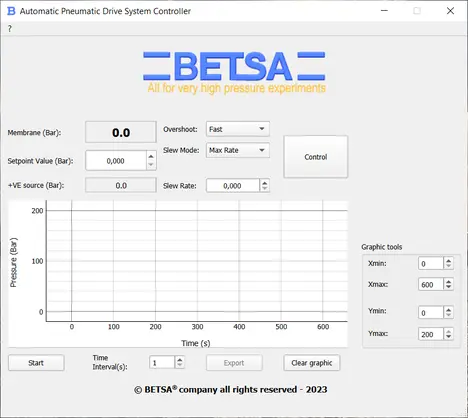
Pneumatic drive system
Membrane pressure control in bar: setpoint, slew mode and rate, live reading of the regulator.
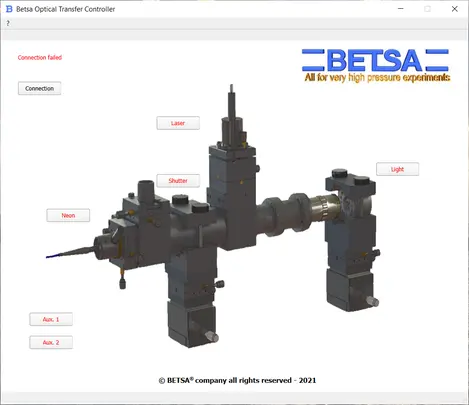
Optical transfer
Laser, shutter, neon lamp, lighting and auxiliary outputs of the motorized optical bench.
Need a specific interface?
Our software is written in-house, alongside the instruments it drives. Tell us about your bench, your detector or the acquisition sequence you need.